왜 dbt인가, 그리고 언제 써야 하나
데이터 팀은 보통 원천 데이터를 웨어하우스로 옮긴 뒤 SQL로 정제하고, 지표를 만들어 대시보드·분석에 제공합니다. 이 과정이 커질수록 SQL 스크립트가 여기저기 흩어지고, 의존성·버전관리·테스트가 어려워집니다. dbt(Data Build Tool) 는 이 문제를 해결하기 위한 표준 도구입니다.
- SQL 변환을 코드로 관리하고, ref()로 의존 그래프를 안전하게 만들며, 테스트·문서화·라인리지를 자동화합니다. PR 기반 협업과 CI/CD도 용이합니다.
- 다음을 기준으로 사용하면 좋습니다.
- 웨어하우스(BigQuery/Snowflake/Redshift/DuckDB 등) 안에서 SQL 기반 변환을 할 때
- 모델 수가 늘어나 의존성/품질 관리가 중요할 때
- 대시보드 지표 정의를 코드로 명확히 남기고 재현 가능하게 하고 싶을 때
dbt 프로젝트 생성
dbt init duck_tutorial
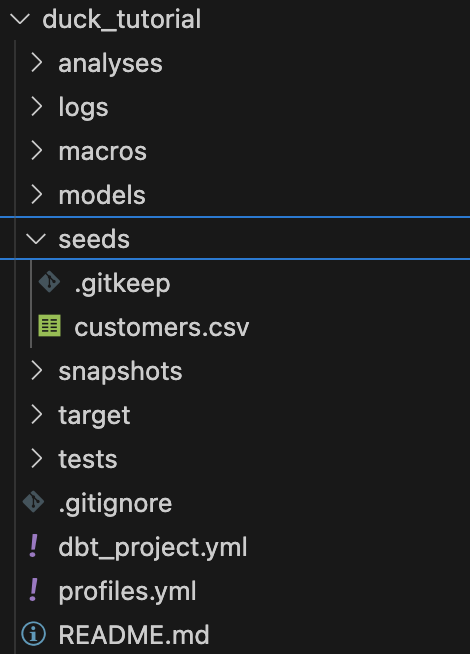
dbt 프로젝트 폴더별 용도는 다음과 같다.
- marts: 데이터 읽고, 최종 저장 ( 다만 원시 적재는 보통 외부 또는 seeds/외부테이블에서 처리 )
- seeds: 초기 데이터 저장용
- macros: 재사용 Jinja 코드(함수·테스트·머티리얼라이제이션/후크/네이밍 오버라이드 등)
- analyses: 컴파일만 되는 분석 쿼리 보관. 실행·테이블 생성 X (문서화/공유 목적)
- snapshots: 속성 이력관리(SCD2) 를 위한 정의와 실행
1. duckdb를 활용한 dbt
예시는 DuckDB 대상입니다. 로컬 csv를 duckdb에 적재하고, duckdb 테이블 데이터를 다른 테이블로 저장하고, 집계하는것을 목표로 합니다.
다른 위치의 profiles를 쓰려면 --profiles-dir 혹은 DBT_PROFILES_DIR 환경변수를 사용합니다.
profiles.yml dbt 환경 파일 생성
duck_tutorial:
  target: dev
  outputs:
    dev:
      type: duckdb
      path: ./dbt.duckdb   # DuckDB 파일 생성 위치(프로젝트 내부)
      threads: 4
      schema: main
seeds/customers.csv 파일 생성
customer_id,first_name,last_name,signup_date,tier
1,Jane,Doe,2025-01-09,free
2,John,Kim,2025-01-10,pro
3,Mina,Park,2025-02-01,free
4,Chulsoo,Lee,2025-02-03,enterprise
5,Aria,Choi,2025-02-10,pro
dbt seed 명령어로 csv의 데이터가 duckdb에 테이블로 적재됩니다. (dbt.duckdb 파일이 생성됩니다.)
$ dbt seed --profiles-dir ./
06:37:03  Running with dbt=1.10.8
06:37:03  Registered adapter: duckdb=1.9.4
06:37:03  Unable to do partial parsing because profile has changed
06:37:04  Found 2 models, 1 seed, 4 data tests, 429 macros
06:37:04
06:37:04  Concurrency: 4 threads (target='dev')
06:37:04
06:37:04  1 of 1 START seed file main.customers .......................................... [RUN]
06:37:04  1 of 1 OK loaded seed file main.customers ...................................... [INSERT 5 in 0.06s]
06:37:04
06:37:04  Finished running 1 seed in 0 hours 0 minutes and 0.20 seconds (0.20s).
06:37:04
06:37:04  Completed successfully
06:37:04
06:37:04  Done. PASS=1 WARN=0 ERROR=0 SKIP=0 NO-OP=0 TOTAL=1
2. 파이프라인을 만들어보자.
- staging/: 원천(또는 seed) 데이터를 '깨끗한 표준 스키마'로 만드는 정제 계층
- 테이블 1:1 대응(가능하면), 컬럼명/타입 정리, 불필요 컬럼 제거, 이상치/NULL 처리, 중복 제거
- 비즈니스 규칙 최소화(집계·복잡한 조인 지양)
- 보통 뷰(view) 또는 ephemeral(CTE 인라인) 로 머티리얼라이즈
- 테스트: not_null, unique, accepted_values, relationships 등 기본 무결성 검증
staging 모델 작성
이번엔 단순하게 데이터를 정제만 하고 저장하는 예제이다. staging 만 추가해주면 된다.
models/staing/clean_customers.sql
{{ config(materialized='table', schema='dbt_tutorial', alias='clean_customers', on_schema_change='sync_all_columns') }}

with source as (
  select * from {{ ref('customers') }}
),
clean as (
  select
    cast(customer_id as integer) as customer_id,
    upper(substr(first_name, 1, 1)) || lower(substr(first_name, 2)) as first_name,
    upper(substr(last_name, 1, 1)) || lower(substr(last_name, 2))  as last_name,
    cast(signup_date as date) as signup_date,
    lower(tier) as tier
  from source
)
select * from clean
customers는 seed 이름이므로 ref('customers')로 참조됩니다.
위의 쿼리로 duckdb에 저장된 customers 의 테이블을 읽고, 정제를 하고 dbt_tutorial.clean_customers 테이블에 저장된다.
dbt를 실행해보자.
$ dbt run -s models/staging/clean_customers.sql
duckdb에 접속하여 저장된 데이터를 확인해 보자.
$ duckdb ./dbt.duckdbD set schema='main_dbt_tutorial';
D select * from clean_customers;
┌─────────────┬────────────┬───────────┬─────────────┬────────────┐
│ customer_id │ first_name │ last_name │ signup_date │ tier │
│ int32 │ varchar │ varchar │ date │ varchar │
├─────────────┼────────────┼───────────┼─────────────┼────────────┤
│ 1 │ Jane │ Doe │ 2025-01-09 │ free │
│ 2 │ John │ Kim │ 2025-01-10 │ pro │
│ 3 │ Mina │ Park │ 2025-02-01 │ free │
│ 4 │ Chulsoo │ Lee │ 2025-02-03 │ enterprise │
│ 5 │ Aria │ Choi │ 2025-02-10 │ pro │
└─────────────┴────────────┴───────────┴─────────────┴────────────┘
이번엔 정제 후 집계까지 하는 예제이다.
staging 과 mart를 구성해 주면된다.
- marts/: 분석가/대시보드가 바로 쓰는 비즈니스 지향 모델
- 차원/팩트(스타 스키마), 지표 집계, 기간별 스냅샷, 복잡한 조인/비즈니스 로직
- 보통 테이블(table) 로 머티리얼라이즈(성능/비용 최적화 목적)
- 대규모는 증분(incremental) 로 구성, BQ면 파티션/클러스터 설정
모델 작성 (staging → mart)
models/staging/str_customers.sql 작성
with source as (
  select * from {{ ref('customers') }}
),
clean as (
  select
    cast(customer_id as integer)                           as customer_id,
    upper(substr(first_name, 1, 1)) || lower(substr(first_name, 2)) as first_name,
    upper(substr(last_name, 1, 1))  || lower(substr(last_name, 2))  as last_name,
    cast(signup_date as date)                              as signup_date,
    lower(tier)                                            as tier
  from source
)
select * from clean
customers는 seed 이름이므로 ref('customers')로 참조됩니다.
mart 모델
모델에 ORDER BY는 넣지 않는 것을 권장합니다. 물리 테이블 생성(CTAS) 시 정렬은 저장 순서를 보장하지 않고, 특히 파티션/클러스터를 함께 사용할 때 에러의 원인이 될 수 있습니다. (정렬이 필요하면 조회 시점에 사용하세요.)
이번엔 mart를 추가해준다. 가입 월별 티어 카운트를 내보는 예제입니다.
models/marts/customer_metrics.sql
with base as (
  select
    customer_id,
    tier,
    date_trunc('month', signup_date) as signup_month
  from {{ ref('stg_customers') }}
)
select
  signup_month,
  tier,
  count(*) as customer_cnt
from base
group by 1,2
테스트 정의 (models/schema.yml)
version: 2

models:
  - name: stg_customers
    columns:
      - name: customer_id
        tests:
          - not_null
          - unique
      - name: tier
        tests:
          - accepted_values:
              values: ['free', 'pro', 'enterprise']

  - name: customer_metrics
    columns:
      - name: signup_month
        tests:
          - not_null
      - name: customer_cnt
        tests:
          - not_null
현재 models의 최종 형태는 다음과 같다.

# 모델 빌드
dbt run

# 테스트
dbt test
dbt run
06:44:39  Running with dbt=1.10.8
06:44:40  Registered adapter: duckdb=1.9.4
06:44:40  [WARNING][MissingArgumentsPropertyInGenericTestDeprecation]: Deprecated
functionality
Found top-level arguments to test `accepted_values`. Arguments to generic tests
should be nested under the `arguments` property.`
06:44:40  [WARNING]: Configuration paths exist in your dbt_project.yml file which do not apply to any resources.
There are 1 unused configuration paths:
- models.duck_tutorial.example
06:44:40  Found 1 seed, 2 models, 5 data tests, 429 macros
06:44:40
06:44:40  Concurrency: 4 threads (target='dev')
06:44:40
06:44:40  1 of 2 START sql view model main.stg_customers ................................. [RUN]
06:44:40  1 of 2 OK created sql view model main.stg_customers ............................ [OK in 0.05s]
06:44:40  2 of 2 START sql view model main.customer_metrics .............................. [RUN]
06:44:40  2 of 2 OK created sql view model main.customer_metrics ......................... [OK in 0.02s]
06:44:40
06:44:40  Finished running 2 view models in 0 hours 0 minutes and 0.26 seconds (0.26s).
06:44:41
06:44:41  Completed successfully
06:44:41
06:44:41  Done. PASS=2 WARN=0 ERROR=0 SKIP=0 NO-OP=0 TOTAL=2
dbt test
dbt test
06:45:13  Running with dbt=1.10.8
06:45:13  Registered adapter: duckdb=1.9.4
06:45:13  [WARNING]: Configuration paths exist in your dbt_project.yml file which do not apply to any resources.
There are 1 unused configuration paths:
- models.duck_tutorial.example
06:45:13  Found 1 seed, 2 models, 5 data tests, 429 macros
06:45:13
06:45:13  Concurrency: 4 threads (target='dev')
06:45:13
06:45:13  3 of 5 START test not_null_customer_metrics_signup_month ....................... [RUN]
06:45:13  4 of 5 START test not_null_stg_customers_customer_id ........................... [RUN]
06:45:13  2 of 5 START test not_null_customer_metrics_customer_cnt ....................... [RUN]
06:45:13  1 of 5 START test accepted_values_stg_customers_tier__free__pro__enterprise .... [RUN]
06:45:13  4 of 5 PASS not_null_stg_customers_customer_id ................................. [PASS in 0.06s]
06:45:13  1 of 5 PASS accepted_values_stg_customers_tier__free__pro__enterprise .......... [PASS in 0.06s]
06:45:13  3 of 5 PASS not_null_customer_metrics_signup_month ............................. [PASS in 0.06s]
06:45:13  2 of 5 PASS not_null_customer_metrics_customer_cnt ............................. [PASS in 0.06s]
06:45:13  5 of 5 START test unique_stg_customers_customer_id ............................. [RUN]
06:45:13  5 of 5 PASS unique_stg_customers_customer_id ................................... [PASS in 0.01s]
06:45:13
06:45:13  Finished running 5 data tests in 0 hours 0 minutes and 0.16 seconds (0.16s).
06:45:13
06:45:13  Completed successfully
06:45:13
06:45:13  Done. PASS=5 WARN=0 ERROR=0 SKIP=0 NO-OP=0 TOTAL=5
duckdb에서 데이터 확인
$ duckdb ./dbt.duckdb
set schema='main_dbt_tutorial';
D select * from customer_metrics;
┌──────────────┬────────────┬──────────────┐
│ signup_month │    tier    │ customer_cnt │
│     date     │  varchar   │    int64     │
├──────────────┼────────────┼──────────────┤
│ 2025-01-01   │ free       │            1 │
│ 2025-01-01   │ pro        │            1 │
│ 2025-02-01   │ enterprise │            1 │
│ 2025-02-01   │ free       │            1 │
│ 2025-02-01   │ pro        │            1 │
└──────────────┴────────────┴──────────────┘
3. BigQuery에 저장하기
이번엔 duckdb가 아닌 bigquery에 데이터를 저장하려고 한다.
어댑터 설치
pip install dbt-bigquery
profile.yaml을 수정한다.
(credentials.json 에는 bigquery 권한이 있는 키를 생성해서 넣어준다.)
duck_tutorial:
  target: bq
  outputs:
    bq:
      type: bigquery
      method: service-account
      keyfile: ./auth/credentials.json
      project: your-gcp-project-id
      dataset: dbt_tutorial
      location: asia-northeast3
      threads: 4
      timeout_seconds: 300
dbt_project.yml 보강
seed를 통해 원천 데이터가 있는곳을 bigquery로 변경합니다.
(칼럼 타입이 없으면 에러가 발생합니다.)
name: 'duck_tutorial'
profile: 'duck_tutorial'
version: '1.0'

models:
  duck_tutorial:
    staging: { +schema: stg }
    marts:   { +schema: mart }

seeds:
  duck_tutorial:
    +schema: raw
    +column_types:
      customers:                  # seeds/customers.csv → 테이블명 customers
        customer_id: INT64
        first_name: STRING
        last_name: STRING
        signup_date: DATE
        tier: STRING
모델 SQL(BigQuery 문법으로 수정)
마지막으로 models/staging/clean_customers.sql에서 캐스팅을 BigQuery 타입으로 바꾸고, config에 파티션 정보를 추가해줍니다.
{{
  config(
    materialized='table',
    schema='dbt_tutorial',
    alias='clean_customers',
    partition_by={'field': 'signup_date', 'data_type': 'date'},
    cluster_by=['tier'],
    on_schema_change='sync_all_columns'
  )
}}

with source as (
  select * from {{ ref('customers') }}
),
clean as (
  select
    cast(customer_id as integer) as customer_id,
    upper(substr(first_name, 1, 1)) || lower(substr(first_name, 2)) as first_name,
    upper(substr(last_name, 1, 1)) || lower(substr(last_name, 2))  as last_name,
    cast(signup_date as date) as signup_date,
    lower(tier) as tier
  from source
)
select * from clean
customers 데이터를 빅쿼리에 업로드하고, clean_custoemers를 실행합니다.
# 시드 적재(스키마 충돌 방지를 위해 최초에는 --full-refresh 권장)
dbt seed --full-refresh --profiles-dir ./

# 모델 실행: raw.customers → stg.clean_customers
dbt run -s models/staging/clean_customers.sql --profiles-dir ./
dbt run -s models/staging/clean_customers.sql --profiles-dir ./

10:55:32  Running with dbt=1.10.8
10:55:34  Registered adapter: bigquery=1.10.1
10:55:34  Found 3 models, 1 seed, 8 data tests, 496 macros
10:55:34
10:55:34  Concurrency: 4 threads (target='bq')
10:55:34
10:55:39  1 of 1 START sql table model dbt_tutorial_stg.clean_customers .................. [RUN]
10:55:42  1 of 1 OK created sql table model dbt_tutorial_stg.clean_customers ............. [CREATE TABLE (5.0 rows, 174.0 Bytes processed) in 2.73s]
10:55:42
10:55:42  Finished running 1 table model in 0 hours 0 minutes and 7.40 seconds (7.40s).
10:55:42
10:55:42  Completed successfully
10:55:42
10:55:42  Done. PASS=1 WARN=0 ERROR=0 SKIP=0 NO-OP=0 TOTAL=1
dbt_tutorial_raw에 원본 데이터, dbt_tutorial_stg에 clean 된 데이터가 생성되었다. (해당 데이터셋의 이름은 profile.yaml의 셋팅과 mart에 있는 sql의 config에 설정되어 있다)

4. 스토리지 -> 빅쿼리로 데이터 저장
마지막으로 원천 데이터가 빅쿼리가 아닌 스토리지에 있다고 가정해보자.
로컬 seed는 더 이상 쓰지 않고, BigQuery 외부 테이블을 통해 GCS를 직접 참조합니다.
패키지 설치
packages.yml
packages:
  - package: dbt-labs/dbt_external_tables
    version: 0.11.1
dbt deps명령어를 통해 패키지를 설치한다.
$ dbt deps
 dbt deps
11:07:18  Running with dbt=1.10.8
11:07:19  Updating lock file in file path: /Users/hyeon.seungjae/devloper/test-dbt/duck_tutorial/package-lock.yml
11:07:19  Installing dbt-labs/dbt_external_tables
11:07:19  Installed from version 0.11.1
11:07:19  Up to date!
소스 선언(외부 테이블)
models/sources/gcs_raw.yml
version: 2

sources:
  - name: raw
    schema: raw                 # 외부 테이블 메타가 기록될 BigQuery Dataset (선택)
    tables:
      - name: customers_gcs     # 외부 테이블 이름
        description: "GCS의 customers CSV"
        external:
          location: "gs://<버킷명>/path/to/customers/*.csv"
          options:
            format: CSV
            skip_leading_rows: 1
            field_delimiter: ","
            allow_jagged_rows: true
            allow_quoted_newlines: true
        columns:                 # 컬럼/타입 정의(특히 CSV는 권장)
          - name: customer_id
            data_type: INT64
          - name: first_name
            data_type: STRING
          - name: last_name
            data_type: STRING
          - name: signup_date
            data_type: DATE
          - name: tier
            data_type: STRING
외부 테이블 생성/갱신됩니다.
dbt run-operation stage_external_sources --vars 'ext_full_refresh: true'
스키마 네이밍(접두사 결합) 제어
BigQuery의 기본 규칙은 target.schema(=profiles.yml의 dataset)에 +schema를 _로 결합합니다.
원하는 이름 그대로 쓰고 싶다면 매크로로 오버라이드해서 사용하면 된다.
macros/generate_schema_name.sql
{% macro generate_schema_name(custom_schema_name, node) -%}
  {%- set custom = (custom_schema_name or '') | trim -%}
  {%- if custom == '' -%}
    {{ target.schema }}
  {%- else -%}
    {{ custom }}
  {%- endif -%}
{%- endmacro %}
실행
$ dbt run -s models/staging/clean_customers.sql
dbt run -s models/staging/clean_customers.sql
07:02:26  Running with dbt=1.10.8
07:02:28  Registered adapter: bigquery=1.10.1
07:02:29  Found 3 models, 1 seed, 8 data tests, 1 source, 547 macros
07:02:29
07:02:29  Concurrency: 4 threads (target='bq')
07:02:29
07:02:31  1 of 1 START sql table model stg.clean_customers ............................... [RUN]
07:02:34  1 of 1 OK created sql table model stg.clean_customers .......................... [CREATE TABLE (5.0 rows, 143.0 Bytes processed) in 3.15s]
07:02:34
07:02:34  Finished running 1 table model in 0 hours 0 minutes and 5.82 seconds (5.82s).
07:02:34
07:02:34  Completed successfully
07:02:34
07:02:34  Done. PASS=1 WARN=0 ERROR=0 SKIP=0 NO-OP=0 TOTAL=1
데이터 확인

5. 스토리지 → BigQuery 집계(marts)까지
마지막으로 스토리지의 csv 데이터를 통해서 빅쿼리에 집계된 데이터를 저장해보자.
기존 duckdb를 사용하여 config가 없었음.
빅쿼리에 저장하도록 config 추가 (저장할곳 셋팅)
기존 from 절의 customers -> raw.cutoemrs_gcs를 보도록 변경한다.
{{
  config(
    materialized='table',
    schema='dbt_tutorial_mart',
    alias='customer_metrics',
    partition_by={'field': 'signup_month', 'data_type': 'date'},
    cluster_by=['tier'],
    on_schema_change='sync_all_columns'
  )
}}


with src as (
  select
    safe_cast(signup_date as date) as signup_date,
    lower(tier) as tier
  from {{ source('raw','customers_gcs') }}
  where signup_date is not null
),
base as (
  select
    DATE_TRUNC(signup_date, MONTH) as signup_month,
    tier
  from src
  where signup_date is not null
)
select
  signup_month,
  tier,
  count(*) as customer_cnt
from base
group by 1,2
해당 집계 sql을 실행해서, 테이블 생성 및 데이터를 저장한다.
dbt run -s models/marts/customer_metrics.sql --profiles-dir ./ --no-partial-parse
결과 확인

번외
07:24:30  Finished running 1 table model in 0 hours 0 minutes and 2.96 seconds (2.96s).
07:24:30
07:24:30  Completed with 1 error, 0 partial successes, and 0 warnings:
07:24:30
07:24:30  Failure in model customer_metrics (models/marts/customer_metrics.sql)
07:24:30    Database Error in model customer_metrics (models/marts/customer_metrics.sql)
  Result of ORDER BY queries cannot be partitioned by field 'signup_month'
  compiled code at target/run/duck_tutorial/models/marts/customer_metrics.sql
빅쿼리의 파티셔닝 테이블에서는 order by 키워드를 넣으면 에러가 발생한다.
그래서 해당 쿼리에서 삭제 했다.
with src as (
  select
    safe_cast(signup_date as date) as signup_date,
    lower(tier) as tier
  from {{ source('raw','customers_gcs') }}
  where signup_date is not null
),
base as (
  select
    DATE_TRUNC(signup_date, MONTH) as signup_month,
    tier
  from src
  where signup_date is not null
)
select
  signup_month,
  tier,
  count(*) as customer_cnt
from base
group by 1,2
하지만 계속 같은 에러가 발생해서
dbt clean
dbt compile -s models/marts/customer_metrics.sql --profiles-dir ./ --no-partial-parse
07:26:14 Found 3 models, 1 seed, 8 data tests, 1 source, 547 macros
07:26:14
07:26:14 Concurrency: 4 threads (target='bq')
07:26:14
Compiled node 'customer_metrics' is:
with src as (
select
-- 문자열일 수 있으므로 안전 캐스팅
safe_cast(signup_date as date) as signup_date,
lower(tier) as tier
from 프로젝트이름.`dbt_tutorial`.`customers_gcs`
where signup_date is not null
),
base as (
select
-- BigQuery 표준 표기: DATE_TRUNC(date_expr, DATE_PART)
DATE_TRUNC(signup_date, MONTH) as signup_month,
tier
from src
where signup_date is not null
)
select
signup_month,
tier,
count(*) as customer_cnt
from base
group by 1,2
order by 1,2
컴파일한 파일에서는 예전 파일을 계속 참조 잇는것으로 나온다. clean으로 지웠지만, 소용이 없었다.
실제 바라보는 경로가 맞는지 확인하기
dbt ls -s models/marts/customer_metrics.sql --output path
정말 해당 파일이 맞는지 확인하기 (저장안했느지, IDE의 에러인지 확인하기)
sed -n '1,200p' models/marts/customer_metrics.sql
나의 경우 IDE 에러로, 저장이 안되고 있었다. 확인을 잘하자.....
끝
'server > 아키텍쳐' 카테고리의 다른 글
| 2. airflow + dbt (1) | 2025.08.31 |
|---|---|
| 로또 시스템 아키텍처 (3) | 2025.08.03 |
| rabbitmq 심화 (persistent / cluster) (0) | 2024.05.05 |
| rabbitmq start (1) | 2024.05.04 |
| airflow scheduler high cpu usage (1) | 2021.11.29 |


