이 예제는 개발(로컬/경량)–운영(클라우드/규모) 분리를 전제로 한다.
- 개발/속도: DuckDB 어댑터로 빠르게 모델을 검증하고, seed·단위테스트 중심으로 피드백 루프를 짧게 한다.
- 운영/확장: BigQuery를 타깃으로 외부 테이블(원천: GCS) → staging → mart의 표준 3계층을 구축한다. 스토리지-컴퓨트 분리를 활용해 대용량에도 비용/성능 균형을 맞춘다.
디렉토리 구조
airflow-dbt-demo/
├─ docker-compose.yml
├─ .env
├─ airflow/
│  ├─ Dockerfile
│  ├─ requirements.txt
│  ├─ dags/
│     └─ dbt_duckdb_demo.py
└─ dbt/
   └─ demo_dbt/
      ├─ dbt_project.yml
      ├─ models/
      │  ├─ marts/order_counts.sql
      │  └─ schema.yml
      ├─ seeds/
      │  └─ orders.csv
      └─ profiles/profiles.yml
airflow/requirements.txt
requests
pandas
numpy
pathlib
beautifulsoup4
psycopg2-binary
sqlalchemy
pymongo
apache-airflow
apache-airflow-providers-ssh
apache-airflow-providers-papermill
dbt-core
dbt-postgres
dbt-duckdb
기본 태스크 순서: dbt debug → dbt deps → dbt seed --full-refresh → dbt run → dbt test
airflow/dags/dbt_duckdb_demo.py
from datetime import datetime
from airflow import DAG
from airflow.operators.bash import BashOperator

DBT_PROJECT_DIR = "/opt/airflow/dbt/demo_dbt"

with DAG(
    dag_id="dbt_duckdb_demo",
    start_date=datetime(2025, 8, 1),
    schedule=None,           # 수동 실행
    catchup=False,
    tags=["dbt", "duckdb", "demo"],
) as dag:

    dbt_debug = BashOperator(
        task_id="dbt_debug",
        bash_command=f"cd {DBT_PROJECT_DIR} && dbt debug"
    )

    dbt_deps = BashOperator(
        task_id="dbt_deps",
        bash_command=f"cd {DBT_PROJECT_DIR} && dbt deps"
    )

    dbt_seed = BashOperator(
        task_id="dbt_seed",
        bash_command=f"cd {DBT_PROJECT_DIR} && dbt seed --full-refresh"
    )

    dbt_run = BashOperator(
        task_id="dbt_run",
        bash_command=f"cd {DBT_PROJECT_DIR} && dbt run"
    )

    dbt_test = BashOperator(
        task_id="dbt_test",
        bash_command=f"cd {DBT_PROJECT_DIR} && dbt test"
    )

    dbt_debug >> dbt_deps >> dbt_seed >> dbt_run >> dbt_test
docker-compose
x-airflow-common: &airflow-common
  build: ./airflow
  env_file:
    - .env
  environment:
    AIRFLOW__CORE__EXECUTOR: LocalExecutor
    AIRFLOW__CORE__LOAD_EXAMPLES: "false"
    AIRFLOW__CORE__DAGS_ARE_PAUSED_AT_CREATION: "false"
    AIRFLOW__DATABASE__SQL_ALCHEMY_CONN: postgresql+psycopg2://airflow:airflow@postgres/airflow
    AIRFLOW__LOGGING__LOGGING_LEVEL: INFO
    DBT_PROFILES_DIR: /opt/airflow/dbt/demo_dbt/profiles
    GOOGLE_APPLICATION_CREDENTIALS: /opt/airflow/gcp/sa.json
    GCP_PROJECT_ID: your-gcp-project-id
    BQ_LOCATION: asia-northeast3
  volumes:
    - ./airflow/dags:/opt/airflow/dags
    - ./airflow/logs:/opt/airflow/logs
    - ./dbt:/opt/airflow/dbt
    - ./gcp:/opt/airflow/gcp:ro
  user: "50000:0"
  depends_on:
    postgres:
      condition: service_healthy
Airflow DAG: 외부테이블 생성 → staging → mart → test
airflow/dags/dbt_bq_from_gcs.py
from datetime import datetime
from airflow import DAG
from airflow.operators.bash import BashOperator

DBT_DIR = "/opt/airflow/dbt/demo_dbt"

with DAG(
    dag_id="dbt_bq_from_gcs",
    start_date=datetime(2025, 8, 1),
    schedule=None,
    catchup=False,
    tags=["dbt", "bigquery", "gcs", "staging", "mart"],
) as dag:

    dbt_debug = BashOperator(
        task_id="dbt_debug",
        bash_command=f"cd {DBT_DIR} && dbt debug"
    )

    dbt_deps = BashOperator(
        task_id="dbt_deps",
        bash_command=f"cd {DBT_DIR} && dbt deps"
    )

    # 외부 테이블 생성/갱신
    stage_external = BashOperator(
        task_id="stage_external_sources",
        bash_command=(
            f'cd {DBT_DIR} && '
            'dbt run-operation stage_external_sources --args \'{"ext_full_refresh": true}\''
        ),
    )

    # 전체 모델 실행(staging, mart 순차)
    dbt_run = BashOperator(
        task_id="dbt_run",
        bash_command=f"cd {DBT_DIR} && dbt run"
    )

    dbt_test = BashOperator(
        task_id="dbt_test",
        bash_command=f"cd {DBT_DIR} && dbt test"
    )

    dbt_debug >> dbt_deps >> stage_external >> dbt_run >> dbt_test
dbt 셋팅
dbt/packages.yml
외부 테이블 생성을 자동화하는 패키지.
packages:
  - package: dbt-labs/dbt_external_tables
    version: 0.11.1
dbt_project.yml
- 레이어별 스키마 분리: staging은 stg 스키마, marts는 mart 스키마로 생성되도록 설정했다. 데이터셋을 논리 계층으로 분할해 거버넌스(권한, 수명, 비용 추적)가 쉬워진다.
- 기본 materialization: 프로젝트 루트에서 +materialized: table을 지정해, 별도 지정이 없을 때 테이블로 생성되게 했다. 필요 시 모델 단위에서 view/incremental로 덮어쓰면 된다.
name: "demo_dbt"
version: "1.0"
config-version: 2
profile: "demo_dbt"

models:
  demo_dbt:
    +materialized: table

  staging:
      +schema: stg
      +tags: ["staging"]

  marts:
    +schema: mart
    +tags: ["mart"]


seeds:
  demo_dbt:
    +header: true
    +quote_columns: false
profiles/profiles.yml
BigQuery 서비스 계정 기반 연결 정의. dataset은 디폴트(미사용), 실제로는 폴더별 +schema에 따라 stg, mart 데이터셋이 생성된다.
demo_dbt:
  target: dev
  outputs:
    dev:
      type: bigquery
      method: service-account
      keyfile: "{{ env_var('GOOGLE_APPLICATION_CREDENTIALS') }}"
      project: "{{ env_var('GCP_PROJECT_ID') }}"
      dataset: analytics   # 기본값(미사용), 모델에서 +schema로 분리
      location: "{{ env_var('BQ_LOCATION') }}"
      threads: 4
      priority: interactive
models/sources/gcs_raw.yml
원천은 GCS Parquet다. 이 선언은 “BigQuery 외부테이블을 어떤 경로·옵션으로 만들 것인가”를 담는다.
여기서 GCS 버킷/경로를 환경에 맞게 바꾸면 된다.
아래 예시는 gs://your-bucket/data/orders/*.parquet 를 외부 테이블로 만든다. 외부 테이블은 raw_ext 데이터셋에 정의된다.
version: 2

sources:
  - name: raw
    schema: dbt_tutorial
    tables:
      - name: orders_ext
        external:
          location: "gs://your-bucket/data/orders/*.parquet"
          options:
            format: PARQUET
staging 모델 models/staging/stg_orders.sql
너의 Parquet 스키마에 맞춰 컬럼명을 맞춰라. 예시는 order_id, customer_id, amount, order_ts 기준.
with src as (
  select * from {{ source('raw', 'orders_ext') }}
),
typed as (
  select
    cast(order_id as int64)         as order_id,
    cast(customer_id as int64)      as customer_id,
    cast(amount as numeric)         as amount,
    cast(order_ts as timestamp)     as order_ts
  from src
)
select * from typed
mart 모델 models/marts/mart_orders_daily.sql
일자 단위 매출 집계 예시.
select
  date(order_ts) as order_date,
  count(*)       as orders_cnt,
  sum(amount)    as revenue
from {{ ref('stg_orders') }}
group by 1
order by 1
macros/generate_schema_name.sql
+schema를 지정했을 때와 아닐 때의 스키마 이름 결정을 단일 매크로로 캡슐화했다. 이 패턴의 이점은 다음과 같다.
- 환경·도메인·레이어 기준의 스키마 네이밍 규칙을 한 곳에서 강제할 수 있다.
- 팀이 “프로젝트별 기본 스키마는 target.schema, 레이어 지정 시엔 custom_schema” 같은 룰을 정했다면, 매크로만 표준화하면 된다.
{% macro generate_schema_name(custom_schema_name, node) -%}
    {%- if custom_schema_name is none -%}
        {{ target.schema }}
    {%- else -%}
        {{ custom_schema_name }}
    {%- endif -%}
{%- endmacro %}
실행~
docker compose build
docker compose run --rm airflow-init
docker compose up -d
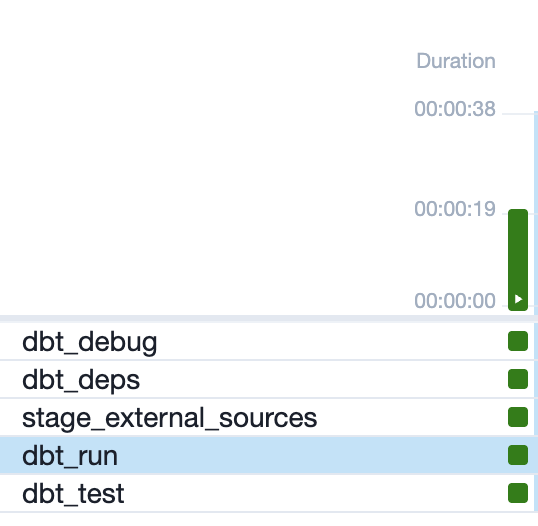
다음과 같이 빅쿼리에 테이블이 생성되고
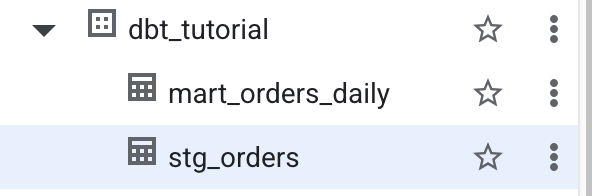
mart_orders_daily에 집계도 잘되어 있는것을 볼수 있다.
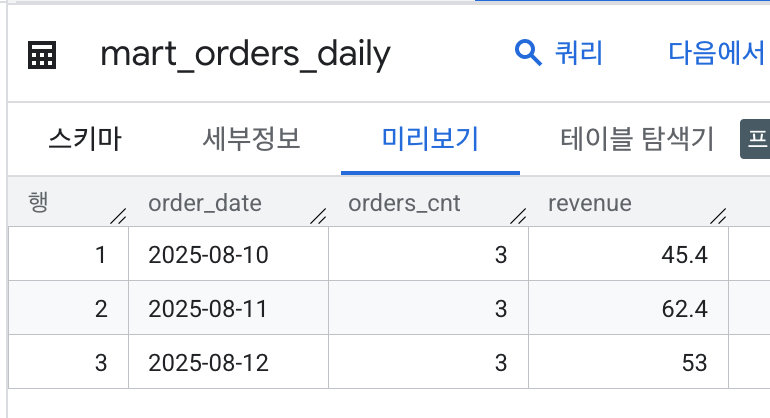
이번엔 스토리지의 모든 parquet 파일을 한꺼번에 동작하는게 아닌,
해당 날짜에 전날의 데이터가 저장되고, 집계되도록 airflow를 수정하려 한다.
models/sources/gcs_raw.yml
version: 2

sources:
  - name: raw
    schema: dbt_tutorial
    tables:
      - name: orders_ext
        external:
          # 전일/특정일 폴더만 바라보도록 vars 사용
          # 예) gs://your-bucket/data/orders/20250810/*.parquet
          location: "gs://your-bucket/data/orders/{{ var('proc_date_yyyymmdd') }}/*.parquet"
          options:
            format: PARQUET
            # 필요시: autodetect: true
models/marts/mart_orders_daily.sql
이렇게 하면 같은 날짜를 다시 돌려도 해당 파티션만 깔끔히 교체됩니다(리트라이·백필 안전).
{{ config(
    materialized='incremental',
    partition_by={'field': 'order_date', 'data_type':'date'},
    incremental_strategy='insert_overwrite',
    on_schema_change='sync_all_columns'
) }}

select
  order_date,
  count(*)    as orders_cnt,
  sum(amount) as revenue
from {{ ref('stg_orders') }}
where order_date = date('{{ var("proc_date") }}')
group by order_date
dag에는 실행시 날짜를 넣어주도록 변수를 추가한다.
from datetime import datetime
from airflow import DAG
from airflow.operators.bash import BashOperator

DBT_DIR = "/opt/airflow/dbt/demo_dbt"

with DAG(
    dag_id="dbt_bq_from_gcs",
    start_date=datetime(2025, 8, 1),
    schedule="@daily",
    catchup=False,
    max_active_runs=1,
    tags=["dbt", "bigquery", "gcs", "staging", "mart"],
) as dag:


    DBT_VARS = (
        "--vars '{"
        "\"proc_date\": \"{{ ds }}\", "
        "\"proc_date_yyyymmdd\": \"{{ ds_nodash }}\", "
        "\"ext_full_refresh\": true "
        "}'"
    )

    dbt_debug = BashOperator(
        task_id="dbt_debug",
        bash_command=f"cd {DBT_DIR} && dbt debug"
    )

    dbt_deps = BashOperator(
        task_id="dbt_deps",
        bash_command=f"cd {DBT_DIR} && dbt deps"
    )

    # 외부 테이블 생성/갱신
    stage_external = BashOperator(
        task_id="stage_external_sources",
        bash_command=(
            f"cd {DBT_DIR} && "
            f"dbt run-operation stage_external_sources {DBT_VARS} "
        )
    )

    # 전체 모델 실행(staging, mart 순차)
    dbt_run = BashOperator(
        task_id="dbt_run",
        bash_command=f"cd {DBT_DIR} && dbt run {DBT_VARS}"
    )

    dbt_test = BashOperator(
        task_id="dbt_test",
        bash_command=f"cd {DBT_DIR} && dbt test {DBT_VARS}"
    )

    dbt_debug >> dbt_deps >> stage_external >> dbt_run >> dbt_test
$ airflow dags list
dag_id          | fileloc                              | owners  | is_paused
================+======================================+=========+==========
dbt_bq_from_gcs | /opt/airflow/dags/dbt_bq_from_gcs.py | airflow | False
dbt_duckdb_demo | /opt/airflow/dags/dbt_duckdb_demo.py | airflow | False
test            | /opt/airflow/dags/test.py            | airflow | False
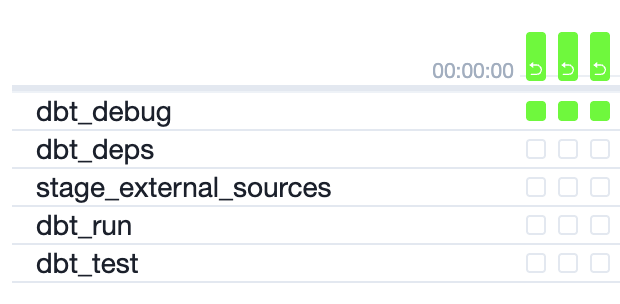
backfill <dag 이름> -s -e 를 통해서 지난 날짜의 데이터를 수행해보자.
 airflow dags backfill dbt_bq_from_gcs -s 2025-08-10 -e 2025-08-12 --reset-dagruns
[2025-08-17T07:19:21.617+0000] {dagbag.py:545} INFO - Filling up the DagBag from /opt/airflow/dags
Nothing to clear.
[2025-08-17T07:19:21.686+0000] {executor_loader.py:235} INFO - Loaded executor: LocalExecutor
[2025-08-17T07:19:21.818+0000] {backfill_job_runner.py:905} INFO - No run dates were found for the given dates and dag interval.
airflow@dbf78f46e040:/opt/airflow$ airflow dags backfill dbt_bq_from_gcs -s 2025-08-10 -e 2025-08-12 --reset-dagruns
[2025-08-17T07:21:08.757+0000] {dagbag.py:545} INFO - Filling up the DagBag from /opt/airflow/dags
Nothing to clear.
[2025-08-17T07:21:08.812+0000] {executor_loader.py:235} INFO - Loaded executor: LocalExecutor
[2025-08-17T07:21:09.165+0000] {base_executor.py:149} INFO - Adding to queue: ['airflow', 'tasks', 'run', 'dbt_bq_from_gcs', 'dbt_debug', 'backfill__2025-08-10T00:00:00+00:00', '--depends-on-past', 'ignore', '--local', '--pool', 'default_pool', '--subdir', 'DAGS_FOLDER/dbt_bq_from_gcs.py', '--cfg-path', '/tmp/tmphkoulyt7']
[2025-08-17T07:21:09.177+0000] {base_executor.py:149} INFO - Adding to queue: ['airflow', 'tasks', 'run', 'dbt_bq_from_gcs', 'dbt_debug', 'backfill__2025-08-11T00:00:00+00:00', '--local', '--pool', 'default_pool', '--subdir', 'DAGS_FOLDER/dbt_bq_from_gcs.py', '--cfg-path', '/tmp/tmp2jm_f9p8']
[2025-08-17T07:21:09.189+0000] {base_executor.py:149} INFO - Adding to queue: ['airflow', 'tasks', 'run', 'dbt_bq_from_gcs', 'dbt_debug', 'backfill__2025-08-12T00:00:00+00:00', '--local', '--pool', 'default_pool', '--subdir', 'DAGS_FOLDER/dbt_bq_from_gcs.py', '--cfg-path', '/tmp/tmpn526ptzm']
[2025-08-17T07:21:13.832+0000] {local_executor.py:90} INFO - QueuedLocalWorker running ['airflow', 'tasks', 'run', 'dbt_bq_from_gcs', 'dbt_debug', 'backfill__2025-08-11T00:00:00+00:00', '--local', '--pool', 'default_pool', '--subdir', 'DAGS_FOLDER/dbt_bq_from_gcs.py', '--cfg-path', '/tmp/tmp2jm_f9p8']
'server > 아키텍쳐' 카테고리의 다른 글
| 1. dbt tutorial (0) | 2025.08.30 |
|---|---|
| 로또 시스템 아키텍처 (3) | 2025.08.03 |
| rabbitmq 심화 (persistent / cluster) (0) | 2024.05.05 |
| rabbitmq start (1) | 2024.05.04 |
| airflow scheduler high cpu usage (1) | 2021.11.29 |


