이 글은 Trino를 이용해 서로 다른 데이터베이스(여기서는 MySQL과 PostgreSQL)를 하나의 쿼리로 조인하는 최소 예제를 그대로 따라 할 수 있도록 정리했습니다.
trino

Trino는 여러 저장소(예: MySQL, PostgreSQL, Hive, BigQuery 등)에 흩어진 데이터를 단일 SQL로 다룰 수 있게 해 주는 분산 쿼리 엔진입니다.
- 이기종 조인: postgresql.sales.orders와 mysql.crm.customers처럼 서로 다른 시스템의 테이블을 직접 조인할 수 있습니다.
- 커넥터-카탈로그 모델: Trino는 커넥터를 통해 외부 시스템에 접속하며, 각 커넥터 인스턴스를 카탈로그로 노출합니다.
- 중요 제약: 트랜잭션을 시스템으로 보장하지 않습니다. 또한 조인 시 네트워크 I/O가 크면 느려질 수 있으며, 필터링/집계를 최대한 조인 전에 하거나, 작은 테이블을 우선으로 브로드캐스트(Trino가 자동 판단)를 유도하는 식으로 설계를 권장합니다.
docker-compose.yaml
services:
  mysql:
    image: mysql:8.0
    container_name: trino-mysql
    environment:
      MYSQL_ROOT_PASSWORD: rootpw
      MYSQL_DATABASE: crm
      MYSQL_USER: app
      MYSQL_PASSWORD: apppw
    ports:
      - "3306:3306"
    volumes:
      - ./mysql/init:/docker-entrypoint-initdb.d
    healthcheck:
      test: ["CMD-SHELL", "mysqladmin ping -h localhost -p$${MYSQL_ROOT_PASSWORD} --silent"]
      interval: 5s
      timeout: 3s
      retries: 30

  postgres:
    image: postgres:16
    container_name: trino-postgres
    environment:
      POSTGRES_PASSWORD: pgpw
      POSTGRES_USER: app
      POSTGRES_DB: sales
    ports:
      - "5432:5432"
    volumes:
      - ./postgres/init:/docker-entrypoint-initdb.d
    healthcheck:
      test: ["CMD-SHELL", "pg_isready -U $$POSTGRES_USER -d $$POSTGRES_DB"]
      interval: 5s
      timeout: 3s
      retries: 30

  trino:
    image: trinodb/trino:latest
    container_name: trino
    depends_on:
      mysql:
        condition: service_healthy
      postgres:
        condition: service_healthy
    ports:
      - "8080:8080"
    volumes:
      - ./trino/catalog:/etc/trino/catalog
    healthcheck:
      # Trino가 기동되면 /v1/info 에 "starting": false 가 나타납니다.
      test: ["CMD-SHELL", "curl -fsS http://localhost:8080/v1/info | grep '\"starting\":false' >/dev/null"]
      interval: 3s
      timeout: 2s
      retries: 60

  client:
    image: python:3.11-slim
    container_name: trino-client
    depends_on:
      trino:
        condition: service_healthy
    volumes:
      - ./client:/app
    working_dir: /app
    command: >
      bash -lc "
      pip install --no-cache-dir trino &&
      python wait_for_trino.py &&
      python run_query.py
      "
카탈로그 설정 파일 준비
접속할 디비들의 설정파일들
# trino/catalog/mysql.properties
connector.name=mysql
connection-url=jdbc:mysql://mysql:3306
connection-user=app
connection-password=apppw
# trino/catalog/postgresql.properties
connector.name=postgresql
connection-url=jdbc:postgresql://postgres:5432/sales
connection-user=app
connection-password=pgpw
MySQL에 접속해 테스트용 고객 테이블 생성
mysql -u root -p


-- 안전하게 DB 보장 후, 해당 DB에 테이블 생성
CREATE DATABASE IF NOT EXISTS crm;
USE crm;

CREATE TABLE IF NOT EXISTS customers (
  id INT PRIMARY KEY,
  name VARCHAR(100) NOT NULL,
  tier ENUM('bronze','silver','gold') NOT NULL
);

INSERT INTO customers (id, name, tier) VALUES
  (1, 'Alice', 'gold'),
  (2, 'Bob', 'silver'),
  (3, 'Charlie', 'bronze'),
  (4, 'Dana', 'gold')
ON DUPLICATE KEY UPDATE name=VALUES(name), tier=VALUES(tier);
PostgreSQL에는 주문 테이블을 생성
psql -h localhost -U app -d sales


-- sales 스키마를 만들고 그 아래에 테이블 생성
CREATE SCHEMA IF NOT EXISTS sales AUTHORIZATION app;

CREATE TABLE IF NOT EXISTS sales.orders (
  id SERIAL PRIMARY KEY,
  customer_id INT NOT NULL,
  amount NUMERIC(12,2) NOT NULL,
  order_date DATE NOT NULL
);
CREATE INDEX IF NOT EXISTS idx_orders_customer_id ON sales.orders(customer_id);


INSERT INTO sales.orders (customer_id, amount, order_date) VALUES
  (1, 120.50, '2025-08-20'),
  (1,  85.00, '2025-08-21'),
  (2,  42.99, '2025-08-21'),
  (4, 300.00, '2025-08-22');
Python 클라이언트
Trino의 Python DB-API 드라이버를 이용해 크로스-엔진 조인과 집계를 실행.
run_query.py
from trino.dbapi import connect
from trino.auth import BasicAuthentication

# Trino 기본은 무인증. auth 생략 가능하지만, 예제 확장성을 위해 placeholder 남김.
conn = connect(
    host="trino",
    port=8080,
    user="client",
    catalog="mysql",
    schema="crm",
    http_scheme="http",
)

cur = conn.cursor()

# MySQL(customers) ↔ PostgreSQL(orders) 조인
query = """
SELECT
  c.id        AS customer_id,
  c.name      AS customer_name,
  c.tier      AS tier,
  o.id        AS order_id,
  o.amount    AS amount,
  o.order_date
FROM postgresql.sales.orders o
JOIN mysql.crm.customers c
  ON o.customer_id = c.id
ORDER BY o.order_date, o.id
"""

cur.execute(query)
rows = cur.fetchall()

# 출력
print("\n== Joined rows ==")
for r in rows:
    print(r)

# 집계 예시
agg_sql = """
SELECT
  c.tier,
  COUNT(*) AS order_cnt,
  ROUND(SUM(o.amount), 2) AS total_amount
FROM postgresql.sales.orders o
JOIN mysql.crm.customers c
  ON o.customer_id = c.id
GROUP BY c.tier
ORDER BY total_amount DESC
"""
cur.execute(agg_sql)
print("\n== Aggregation by tier ==")
for r in cur.fetchall():
    print(r)
Trino 준비 대기 스크립트
wait_for_trino.py
Trino가 완전히 올라오고 카탈로그가 로딩될 때까지 기다린 뒤 쿼리를 실행합니다. 두 단계로 나뉩니다.
- /v1/info에서 "starting": false가 될 때까지 대기
- SHOW CATALOGS로 mysql, postgresql이 보일 때까지 대기
import time, sys, requests
from trino.dbapi import connect

TRINO_URL = "http://trino:8080/v1/info"

def trino_active():
    try:
        r = requests.get(TRINO_URL, timeout=2)
        if r.ok and r.json().get("starting") is False:
            return True
    except Exception:
        pass
    return False

def catalogs_ready():
    try:
        conn = connect(host="trino", port=8080, user="waiter")
        cur = conn.cursor()
        cur.execute("SHOW CATALOGS")
        cats = {r[0] for r in cur.fetchall()}
        # mysql / postgresql 카탈로그가 떠 있어야 초기화가 끝난 것
        return {"mysql", "postgresql"}.issubset(cats)
    except Exception:
        return False

# 1단계: 서버 ACTIVE 대기
for _ in range(120):
    if trino_active():
        print("Trino API active.")
        break
    print("Waiting Trino API ...")
    time.sleep(1)
else:
    print("Trino API not active in time.")
    sys.exit(1)

# 2단계: 커넥터(카탈로그) 로딩 대기
for _ in range(120):
    if catalogs_ready():
        print("Trino catalogs ready (mysql, postgresql).")
        sys.exit(0)
    print("Waiting catalogs (mysql/postgresql) ...")
    time.sleep(1)

print("Trino catalogs not ready in time.")
sys.exit(1)
최종 결과 - 집계 테이블 완료
2025-08-23 17:26:16 trino-client    |
2025-08-23 17:26:16 trino-client    | == Joined rows ==
2025-08-23 17:26:16 trino-client    | [1, 'Alice', 'gold', 1, Decimal('120.50'), datetime.date(2025, 8, 20)]
2025-08-23 17:26:16 trino-client    | [1, 'Alice', 'gold', 2, Decimal('85.00'), datetime.date(2025, 8, 21)]
2025-08-23 17:26:16 trino-client    | [2, 'Bob', 'silver', 3, Decimal('42.99'), datetime.date(2025, 8, 21)]
2025-08-23 17:26:16 trino-client    | [4, 'Dana', 'gold', 4, Decimal('300.00'), datetime.date(2025, 8, 22)]
2025-08-23 17:26:16 trino-client    |
2025-08-23 17:26:16 trino-client    | == Aggregation by tier ==
2025-08-23 17:26:16 trino-client    | ['gold', 3, Decimal('505.50')]
2025-08-23 17:26:16 trino-client    | ['silver', 1, Decimal('42.99')]
2033-01-01 00:00:00
trino-client exited with code 0
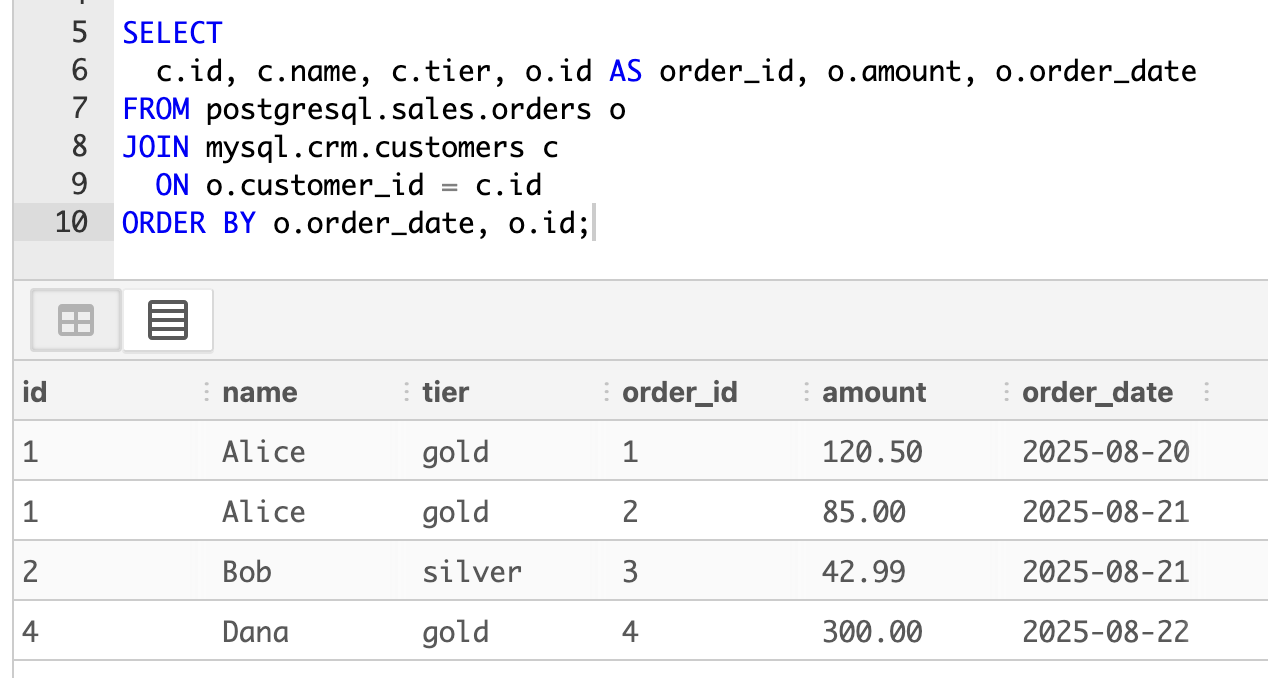
SQLPad로 UI에서 실행
SQLPad를 붙이면 브라우저에서 동일한 크로스-엔진 조인을 바로 실행 가능.
Trino 연결 정보를 환경 변수로 선언.
기본 카탈로그/스키마는 mysql.crm로 시작하도록 설정했지만, 쿼리에서는 완전 수식 이름을 계속 사용할 수 있습니다.
  sqlpad:
    image: sqlpad/sqlpad:latest
    container_name: sqlpad
    depends_on:
      trino:
        condition: service_started
    ports:
      - "3000:3000"
    environment:
      # 관리자 계정
      SQLPAD_ADMIN: admin@local
      SQLPAD_ADMIN_PASSWORD: adminpw

      SQLPAD_CONNECTIONS__trino_local__name: "Trino (local)"
      SQLPAD_CONNECTIONS__trino_local__driver: "trino"
      SQLPAD_CONNECTIONS__trino_local__host: "trino"
      SQLPAD_CONNECTIONS__trino_local__port: 8080
      SQLPAD_CONNECTIONS__trino_local__username: "sqlpad"
      SQLPAD_CONNECTIONS__trino_local__catalog: "mysql"       # 기본 카탈로그(초기값)
      SQLPAD_CONNECTIONS__trino_local__schema: "crm"          # 기본 스키마(초기값)

      SQLPAD_APP_LOG_LEVEL: "info"

    volumes:
      - ./sqlpad-data:/var/lib/sqlpad
SELECT
  c.id, c.name, c.tier, o.id AS order_id, o.amount, o.order_date
FROM postgresql.sales.orders o
JOIN mysql.crm.customers c
  ON o.customer_id = c.id
ORDER BY o.order_date, o.id;
'Database > DB' 카테고리의 다른 글
| ClickHouse - Lightning Fast Analytics for Everyone (0) | 2025.11.16 |
|---|---|
| MySQL id 범위 조건 하나로 10분 → 2분 (0) | 2025.09.04 |
| [논문] Presto: SQL on Everything / A Decade of SQL Analytics at Meta / History-based Query Optimizer (2) | 2025.08.27 |
| 3. MySQL CDC 데이터를 Debezium을 통해 Pub/Sub으로 전송하기 (1) | 2025.08.17 |
| 2. mysql master - slave Replication (2) | 2025.08.16 |

