브랜칭은 런타임 조건에 따라 실행 경로를 선택하는 기능
- 쓰임새: 데이터 유효성 검증(있으면 진행/없으면 스킵), 환경별 처리(dev/prod), 시간대별로 다른 경로, 리소스 절감 등.
- 브랜치에 **선택되지 않은 태스크는 실패가 아닌 skipped**로 표시
1. @task.branch Decorator
해당 테스크의 리턴값으로 다음 task의 분기를 결정.
(airflow의 설계 사상에서는 task 내에 if 문으로 처리하기 보다는 각각의 독립된 task를 사용하도록 권장하고 있다.
그래서 branch를 통해서 다음에 어느 task를 실행할지를 결정해야 한다.
from airflow import DAG
from airflow.decorators import task
from airflow.operators.empty import EmptyOperator
import pendulum

with DAG(
    dag_id='test_branching',
    start_date=pendulum.datetime(2025,1,1,tz="Asia/Seoul"),
    schedule_interval='@once',
    catchup=False
) as dag:

    @task.branch
    def pick_path(day: str) -> str:
        # 월~금: weekday, 주말: weekend
        return "weekday" if day in {"Mon","Tue","Wed","Thu","Fri"} else "weekend"

    weekday = EmptyOperator(task_id="weekday")
    weekend = EmptyOperator(task_id="weekend")

    done = EmptyOperator(
        task_id="join",
        trigger_rule="none_failed_min_one_success"  # 브랜치 조인 규칙 필수!
    )

    pick_path("Sun") >> [weekday, weekend] >> done
위의 코드를 실행해보면 리턴값이 weekend가 되므로, weekend task가 실행되고, weekday task는 skip 된다.
당연히 어느 task가 실행되도 다음 task가 진행되므로,
trigger_rule="none_failed_min_one_success" # 브랜치 조인 규칙 필수!이 필수적으로 들어가야 한다.

2. @task.short_circuit
Go / No-Go(진행/중단)의 이진 결정
- return True → “모든” 다운스트림 계속
- return False → “모든” 다운스트림 스킵
- 데이터 유효성 체크, 시간대 체크 등 단순 체크포인트에 적합 (복잡한건 따로 task로 생성하는게 원칙)
다음 코드를 실행해보면 step_1에서 True일때에만 다음 task가 실행되므로, stpe_2는 skip이 됩니다.
from airflow import DAG
from airflow.decorators import task
from airflow.operators.empty import EmptyOperator
import pendulum
from airflow.utils.trigger_rule import TriggerRule

with DAG(
    dag_id='test_branching_short_circuit',
    start_date=pendulum.datetime(2025,1,1,tz="Asia/Seoul"),
    schedule_interval='@once',
    catchup=False
) as dag:

    @task.short_circuit(ignore_downstream_trigger_rules=True) # 리턴이 True일때에만 다음 task 실행
    def step_1():
        return False


    @task
    def step_2():
        return "step_2"

    step_1() >> step_2()

만일 stpe_2가 skip되어도 실행하고 싶다면 task_rule를 지정하면 됩니다.
ALWAYS로 설정하면 fail이여도 무조건 실행됩니다.
from airflow import DAG
from airflow.decorators import task
from airflow.operators.empty import EmptyOperator
import pendulum
from airflow.utils.trigger_rule import TriggerRule

with DAG(
    dag_id='test_branching_short_circuit',
    start_date=pendulum.datetime(2025,1,1,tz="Asia/Seoul"),
    schedule_interval='@once',
    catchup=False
) as dag:

    @task.short_circuit(ignore_downstream_trigger_rules=True) # 리턴이 True일때에만 다음 task 실행
    def step_1():
        return False


    @task
    def step_2():
        return "step_2"


    # NONE_FAILED = 이전 단계들이 모두 성공 또는 스킵일 경우에만 실행
    @task(trigger_rule=TriggerRule.NONE_FAILED)
    def step_3():
        return "step_3"

    # ALWAYS = 이전 단계들이 성공/실패 상관없이 실행
    @task(trigger_rule=TriggerRule.ALWAYS)
    def step_4():
        return "step_4"


    step_1() >> step_2() >> step_3() >> step_4()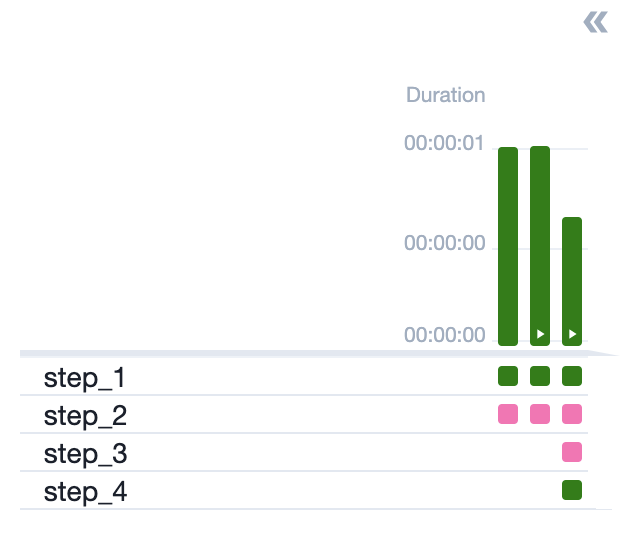
airflow의 Trigger Rule은 다음과 같습니다.
https://airflow.apache.org/docs/apache-airflow/2.2.5/concepts/dags.html?#trigger-rules
Trigger Rules
By default, Airflow will wait for all upstream (direct parents) tasks for a task to be successful before it runs that task.
However, this is just the default behaviour, and you can control it using the trigger_rule argument to a Task. The options for trigger_rule are:
- all_success (default): All upstream tasks have succeeded
- all_failed: All upstream tasks are in a failed or upstream_failed state
- all_done: All upstream tasks are done with their execution
- one_failed: At least one upstream task has failed (does not wait for all upstream tasks to be done)
- one_success: At least one upstream task has succeeded (does not wait for all upstream tasks to be done)
- none_failed: All upstream tasks have not failed or upstream_failed - that is, all upstream tasks have succeeded or been skipped
- none_failed_min_one_success: All upstream tasks have not failed or upstream_failed, and at least one upstream task has succeeded.
- none_skipped: No upstream task is in a skipped state - that is, all upstream tasks are in a success, failed, or upstream_failed state
- always: No dependencies at all, run this task at any time
3. Specialized Branch Operators
BranchSQLOperator SQL 결과(첫 행/첫 컬럼의 truthy 여부 등)로 분기.
from airflow.operators.sql import BaseSQLOperator
from airflow.providers.standard.operators.empty import EmptyOperator

check = BranchSQLOperator(
    task_id="check_exists",
    conn_id="my_postgres",
    sql="SELECT COUNT(*)>0 FROM staging.new_data",
    follow_task_ids_if_true=["load_new"],
    follow_task_ids_if_false=["no_op"],
)

load_new = EmptyOperator(task_id="load_new")
no_op = EmptyOperator(task_id="no_op")
join = EmptyOperator(task_id="join", trigger_rule="none_failed_min_one_success")

check >> [load_new, no_op] >> join
BranchDayOfWeekOperator 요일 분기
from airflow.operators.weekday import BranchDayOfWeekOperator

empty_task_1 = EmptyOperator(task_id='branch_true', dag=dag)
empty_task_2 = EmptyOperator(task_id='branch_false', dag=dag)

branch = BranchDayOfWeekOperator(
    task_id="make_choice",
    follow_task_ids_if_true="branch_true",
    follow_task_ids_if_false="branch_false",
    week_day="Monday",
)

branch >> [empty_task_1, empty_task_2]
BranchDateTimeOperator 업무시간/유지보수 창 등 시간 창(window) 기준 분기.
# [START howto_branch_datetime_operator]
empty_task_1 = EmptyOperator(task_id='date_in_range', dag=dag)
empty_task_2 = EmptyOperator(task_id='date_outside_range', dag=dag)

cond1 = BranchDateTimeOperator(
    task_id='datetime_branch',
    follow_task_ids_if_true=['date_in_range'],
    follow_task_ids_if_false=['date_outside_range'],
    target_upper=pendulum.datetime(2020, 10, 10, 15, 0, 0),
    target_lower=pendulum.datetime(2020, 10, 10, 14, 0, 0),
    dag=dag,
)

# Run empty_task_1 if cond1 executes between 2020-10-10 14:00:00 and 2020-10-10 15:00:00
cond1 >> [empty_task_1, empty_task_2]
'ML > 데이터 분석' 카테고리의 다른 글
| ALS 논문 : MATRIX FACTORIZATION TECHNIQUES FOR RECOMMENDER SYSTEMS (0) | 2026.01.21 |
|---|---|
| [airflow] certified (0) | 2025.10.29 |
| CoxPHFitter (2) | 2025.07.23 |
| 2. 3점 슛이 코트를 지배하는가? (1) | 2025.07.05 |
| 1. 영화관은 정말 망해가고 있는걸까? (0) | 2025.06.29 |


